

Web design · CMS & Technology
Top 5 featuresturn WordPress into a powerful CMS
The WordPress CMS powers over 40 % of all websites — from one-page sites to complex web applications. This article looks at the five key features behind it, how the system compares to Joomla and Wix, and which projects it’s really best suited for.
- market share
- Over 40 %all websites worldwide
- Extensions
- 59,000+ pluginsSEO, shop, booking, analytics
- Licence
- Open Sourcefree and independent of providers
- Application range
- Onepager to multisiteone installation, many websites
Overview
The WordPress CMS is the most widely used content management system in the world and powers over 40 % of all websites. What makes this platform so popular?
In addition to its widespread use, WordPress impresses with features that flexible, scalable and user-friendly do — for sole traders as well as international corporations.
In this post, we introduce the five most important features that make WordPress a powerful CMS — and show why it is the first choice for many web projects.
Source: WordPress.org (2021)
Why a CMS is important
A content management system (CMS) makes it possible to create and manage content on a website without needing programming knowledge. It separates design from content and allows teams from marketing, editorial or administration to maintain website content efficiently.
A good CMS is scalable, flexible and intuitive to use — precisely these qualities are ideally offered by WordPress.
How does a CMS work?
A CMS generally consists of two components:
Content Management Application
The interface for managing pages, posts and media — basically everything that editorial and marketing use every day.
Content Delivery Application
The technical part that presents content to visitors – for example via themes and templates.
WordPress combines both parts in a user-friendly environment. Content can be edited via the dashboard, while the design is controlled through customisable themes.
Are you relying on a robust CMS?
With WordPress and the expertise of Synext IT, you get a flexible, scalable and search-engine-friendly website that suits your business.
Benefits of using a CMS
- User-friendly — even without programming knowledge
- Rapid content updating
- Consistent design across all pages
- Collaboration via user roles
- search engine friendly structure
- Support for multilingual content
- Scalable and secure through regular updates
The platform offers all these benefits — and more.
WordPress compared to other CMS platforms
How does WordPress compare to Joomla or Wix?
| criterion | WordPress | Joomla | Wix |
|---|---|---|---|
| Usability | Beginner-friendly dashboard | Steeper learning curve | Very simple, but heavily restricted |
| Extensibility | Over 59,000 plugins | Significantly smaller directory | Restricted to one's own app store |
| Design | Themes, Child-Themes, Page-Builder | Templates, mostly with developer assistance | templates, hard to change later |
| Licence & Costs | Open source, free of charge | Open source, free of charge | provider's subscription model |
| Data sovereignty | Self-hosting, full access | Self-hosting, full access | Platform-bound |
| Community | Very large, solutions easy to find | Active, but smaller | Support via the provider |
| Removal | Export and provider switch possible at any time | Possible, with effort | Incomplete website export |
Source: WordPress.org · Status: 23/07/2025
Thanks to its huge community, extensibility and ease of use, WordPress is the optimal solution for many use cases.
Why WordPress is developer-friendly
Developers in particular appreciate the platform for the following reasons:
- Support of REST API for headless projects
- Custom post types and taxonomies
- Customisability via hooks & filters
- Extensive options for theme and plugin development
- Multisite feature to centrally manage multiple websites
From a simple one-pager to a complex web application: WordPress is flexible enough to handle any project.
From practice
Where standard plugins don't fit, we develop our own: from booking and access logic to price calculators. That is precisely what hooks, filters and custom post types are meant for — instead of bending an off-the-shelf plugin until the next update breaks it.
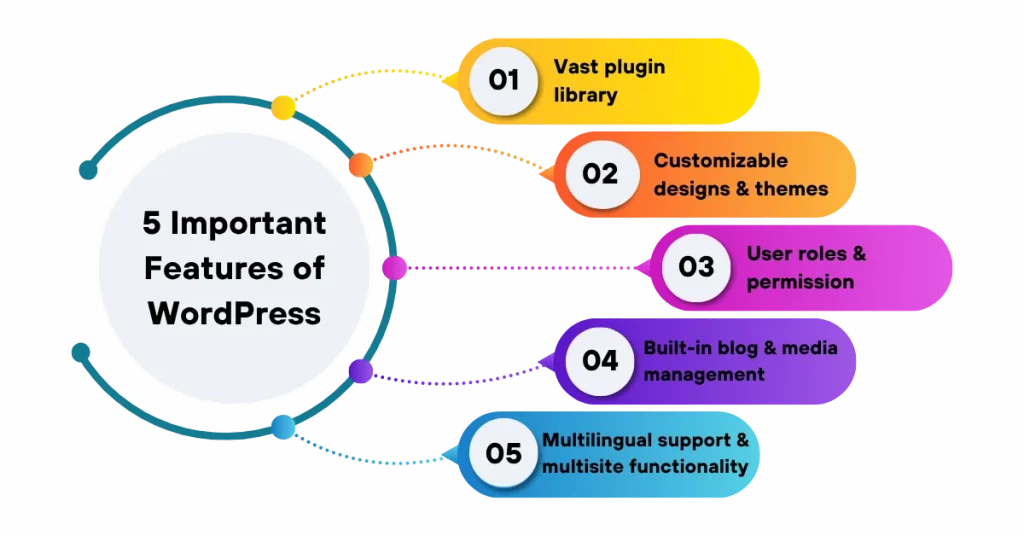
The 5 most important features of WordPress
These five features explain why WordPress works in such diverse projects — from a club website to an international corporation.
Huge plugin library
With over 59,000+ plugins, you can add almost any feature: SEO, security, e-commerce, contact forms, bookings, analytics and more. Many integrations work straight away — without any additional coding.
Customisable designs & themes
Use ready-made themes or develop your own. Page builders such as Elementor or the Gutenberg editor enable custom design, even without prior technical knowledge. With child themes, your modifications remain update-safe.
User roles & permissions management
Roles such as administrator, editor, author or subscriber allow responsibilities to be managed precisely. This is particularly important for teams with multiple contributors.
Integrated Blog and Media Management
Started as a blogging platform, WordPress continues to offer first-class tools for publishing content — including a media library, post scheduling, categories and tags.
Multilingualism & Multisite Support
Plugins such as WPML or TranslatePress allow multilingual websites to be implemented easily. With the multisite feature, you can manage multiple websites — for example, for branches or country pages — from a single installation.
Requirement check: Is WordPress suitable for your project?
Tick off what applies to your project. The result is not a technical analysis, but an initial assessment of how well WordPress fits your requirements.
No system suits every project. Where another CMS or a custom application makes more sense, we say so.
Do you need a high-performance WordPress website?
We plan, develop and support WordPress projects for companies in Germany — from the relaunch of existing sites to custom plugins for requirements that no standard system covers.
Synext IT offers
From design to ongoing support.
- Individual design
- GDPR-compliant implementation
- Fast loading times & SEO
- WooCommerce & Multilingualism
- Custom plugin development
- Maintenance, updates & monitoring
Tell us about your project — we will tell you what it takes technically.
Frequently Asked Questions (FAQ) — WordPress CMS
What makes WordPress so popular?
WordPress is free, flexible and easy to use. It is suitable for blogs, corporate websites and online shops of all sizes.
What are the main features?
- Over 59,000 plugins
- Customisable Themes & Page Builder
- User roles & permissions management
- Blog and Media Management
- Multilingualism & WooCommerce
- SEO and security features
What does CMS mean in WordPress?
A CMS is a system for easily managing website content — without any programming knowledge. WordPress provides a user-friendly backend for this.
How does WordPress differ from other systems?
WordPress offers the greatest variety of extensions, is easier to use, customisable, open source and independent of the provider.
Why is WordPress ideal for many projects?
It is user-friendly, developer-friendly, versatile, SEO-friendly, GDPR-compliant and is constantly being further developed.
What are the advantages of WordPress?
- Open source and free
- Huge selection of plugins & themes
- Intuitive backend
- Suitable for businesses of all sizes
- GDPR-compliant & SEO-optimised
Next step
First the project, then the system.
The system question is decided by your requirements, not market share. A brief conversation clarifies what your project really needs technically.
- Reply within 24 hours
- 100 % (no obligation)
- Honest recommendation instead of hard selling
Performance
WordPress development
Custom design, GDPR-compliant implementation, fast loading times, WooCommerce and multilingualism — all from a single source.
View servicesPersonal advice · Response within 24 hours
 English
  German